Roon and unsupported hardware: why Tune is becoming the universal proxy for non-RoonReady devices
Correction (15 mai 2026)
Cet article contenait des inexactitudes sur les capacités de Roon signalées par la communauté. Roon supporte nativement AirPlay, Chromecast et Sonos S2 en plus des appareils certifiés RoonReady. L article a été corrigé en conséquence. Note : la version initiale de cet article a été générée avec l aide d une IA et contenait des erreurs factuelles que nous aurions dû vérifier avant publication. Nous nous en excusons.
Key takeaways
- Roon natively drives devices certified RoonReady (RAAT protocol), plus AirPlay, Chromecast, and Sonos S2 endpoints. Hardware outside these supported protocols — Micromega M-One, QAT RS3, older Naim without AirPlay, Sonos S1, modified Squeezebox — requires a relay endpoint (Roon Bridge on a Pi) or stays out of Roon.
- Tune takes the opposite approach: a universal DLNA/UPnP gateway. Any device that speaks DLNA, AirPlay 1/2, Sonos S1/S2 or Chromecast is driven natively, with no certification and no overlay layer.
- Real-world bottom line: everything RoonReady works under Roon (very well, in fact); for the rest, it depends — and that's where Tune becomes the complement, or the replacement.
The RoonReady program: strengths and blind spots
RoonReady is a proprietary certification program managed by Roon Labs. A manufacturer pays for certification, integrates the Roon SDK (RAAT — Roon Advanced Audio Transport), and the device becomes natively controllable by Roon with bit-perfect handling, synchronized multi-room and rich metadata.
On paper it's excellent: RAAT manages latency, sub-ms multi-room sync, native DSD and MQA. In practice, any RoonReady-certified hardware works admirably under Roon — that's the heart of the Roon experience and nobody disputes it.
The trouble starts with the program's blind spots:
- Cost of certification: prohibitive for small audiophile brands or long-established manufacturers.
- Older hardware never updated: first-gen Naim Mu-so, pre-2018 Linn DS, Devialet Expert before 2017 — nothing.
- Brands that refuse the closed ecosystem: Micromega (M-One), QAT (RS3), some high-end Chinese DACs.
- Sonos S1: Roon supports Sonos S2 natively, but the older S1 units (Play:1, Play:3, Play:5 gen1, Connect:Amp gen1) are not supported.
The consequence: an audiophile with a mixed rig (a recent RoonReady streamer plus 2 legacy devices) has to juggle two ecosystems or rig up Roon Bridges on Raspberry Pis. That's where the Tune vs Roon comparison takes on its full meaning.
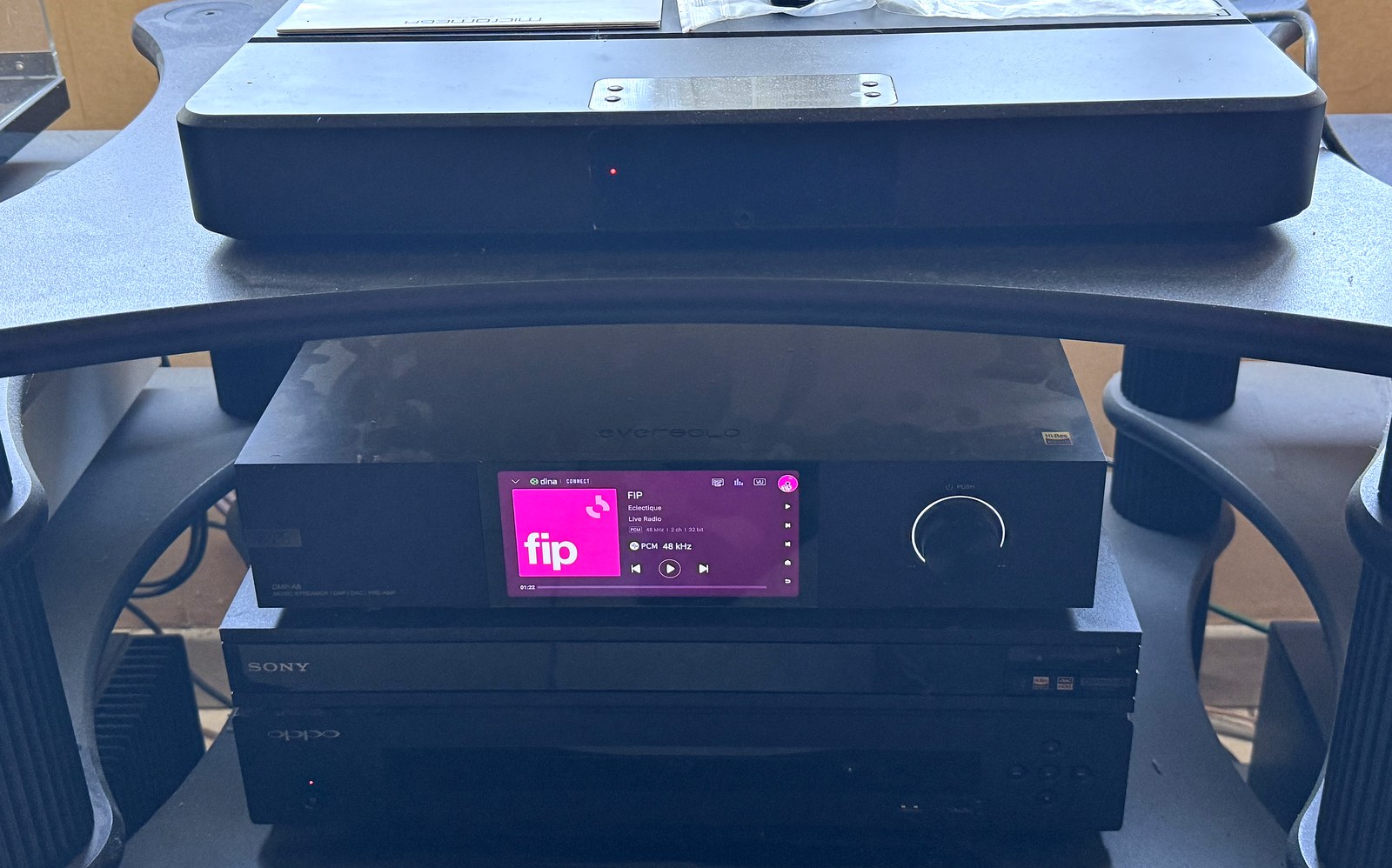
DLNA/UPnP: the standard Tune embraces
DLNA (Digital Living Network Alliance) and its UPnP AV subset is the open standard that has equipped the vast majority of network audio gear since 2005. Naim, Linn, Cambridge Audio, Yamaha, Denon, Marantz, Pioneer, Onkyo, Bluesound, Cocktail Audio, Auralic, Lumin — all of them speak DLNA.
Tune starts from this fact and makes the opposite choice from Roon: instead of demanding certification, we speak the protocol the device already speaks. DLNA for 90% of audiophile hardware, AirPlay 1/2 for Apple/HomePod, native Sonos S1+S2, Chromecast Audio, and UPnP for displays and NAS units. No proprietary SDK, no royalties, no "whitelist".
The trade-off: DLNA doesn't have RAAT's sub-ms sync. For multi-room broadcast — "listen to jazz in the living room, the kitchen, the bathroom" — DLNA's sync is plenty good enough (~50-200 ms drift, inaudible if the rooms are separated). For genuinely sync'd room-to-room distributed stereo, AirPlay 2 or Sonos rely on their own protocols.
10 concrete examples of non-RoonReady hardware
List based on JP feedback and the Tune community (April 2026). For each case: why Roon doesn't drive it, and what Tune does instead.
1. Micromega M-One (100/150)
Why non-RoonReady: Micromega never paid for RAAT certification. The M-One integrated amplifier does native DLNA + AirPlay but Roon doesn't see it as an endpoint.
Tune method: automatic DLNA detection at startup, appears in Zones, native FLAC 24/192 playback with no transcoding.
2. QAT RS3 (audiophile network player)
Why non-RoonReady: a Chinese high-end brand that prefers its own ecosystem + standard DLNA. No certification plans announced.
Tune method: add via DLNA push (BubbleUPnP-compatible), DSD64 handled in DoP.
3. Naim Mu-so 1st generation (2014-2019)
Why non-RoonReady: Naim only certified the Mu-so 2nd gen and the New Classic line. Mu-so v1 units stay on DLNA + AirPlay 1.
Tune method: native DLNA. Bonus: Tune also handles AirPlay 1 if you prefer.
4. Linn DS pre-2018 (Akurate DS, original Klimax DS)
Why non-RoonReady: Linn doesn't renew certification on its older streamers. Only the recent Selekt DSM and Klimax DSM are RoonReady.
Tune method: OpenHome support (which Linn championed) on top of classic DLNA. Gapless, server-side queue, volume control.
5. Sonos S1 (Play:1, Play:3, Play:5 gen1, Connect:Amp gen1)
Why limited under Roon: Roon supports Sonos S2 natively. However, older S1 units (Play:1, Play:3, Play:5 gen1, Connect:Amp gen1) are not supported by Roon.
Tune method: Sonos S1 and S2 both supported, native grouped multi-room via Sonos SOAP/UPnP.
6. Devialet Expert (pre-2017)
Nuance: Roon supporte les Devialet Expert et Expert Pro via AirPlay et Chromecast (voir doc Roon). Cependant, les Expert pré-2017 sans carte streaming restent limités au protocole AIR propriétaire.
Tune method: AirPlay 1 (present on every Expert) or DLNA via the optional streaming card.
7. Modified Squeezebox Touch / Classic / Boom
Why non-RoonReady: Logitech abandoned the line. Roon supports Squeezebox via emulation but it's unstable depending on the modified firmware.
Tune method: Tune speaks UPnP/DLNA and the Logitech Media Server (LMS) coexists without conflict. You keep your Squeezebox setup and add Tune as a secondary zone.
8. Yamaha MusicCast (entry and mid range)
Why non-RoonReady: Yamaha only certified its high-end line (CD-NT670D and above). The WX-010, WX-030 and most MusicCast AV receivers stay out of Roon.
Tune method: DLNA + AirPlay 2 on 2018+ models. MusicCast multi-room driven.
9. Cocktail Audio X14 / X35 / X45 (early generations)
Why non-RoonReady: Cocktail Audio (Novatron) doesn't go for RAAT certification. They ship their own playback OS.
Tune method: DLNA/OpenHome renderer fully supported, bit-perfect transport up to DSD256.
10. "Orphan" network DACs (Audio-gd, Holo May, some Denafrips)
Why non-RoonReady: small audiophile production runs, no software department to integrate the Roon SDK.
Tune method: hook it up via a Pi 4/5 running Tune over USB-Audio, expose the output as a virtual DLNA zone. Drivable from the Tune mobile app like any other zone.
Bonus 11-12: Bose SoundTouch and old Sony HAP
Bose SoundTouch was never RoonReady (Bose maintains its closed ecosystem) — Tune sees them via DLNA. The Sony HAP-Z1ES / HAP-S1 (audiophile HDD players from 2014) are recognized as DLNA servers and can be driven by Tune as either source or target.
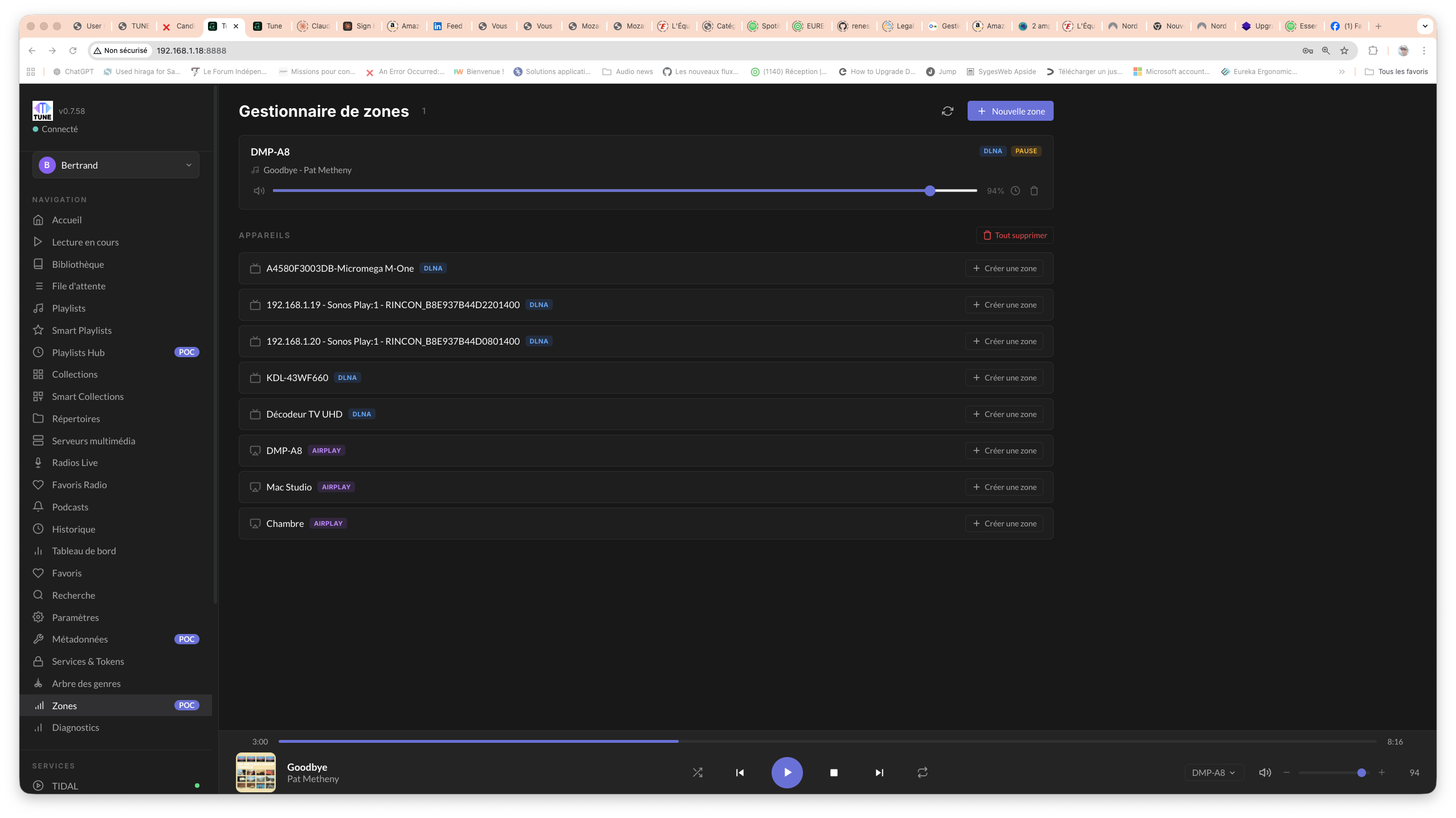
The Tune method: adding an unsupported device
The golden rule: if the device is powered on, on the network, and speaks a standard protocol, Tune sees it in under 60 seconds. No IP entry, no manual "add device" in 95% of cases.
- Plug the device into the network (Ethernet preferred, Wi-Fi accepted).
- Launch Tune. SSDP/Bonjour discovery scans on a loop.
- Go to Zones. The device appears with its manufacturer name (e.g. "Naim Mu-so qb", "Sonos Living Room", "Linn Akurate DS").
- Click "Activate". Playback test: a short FLAC is sent to validate the renderer.
- If the render is OK, the zone is saved. Otherwise, Tune shows the exact DLNA error code (useful for Naim/Linn setups).
For trickier cases (buggy old DLNA firmware, USB DACs), a Diagnostics tab lets you inspect the raw SOAP requests and identify the problem.
Roon vs Tune comparison table by brand
| Brand/Model | Roon (RoonReady) | Tune (DLNA/AirPlay/Sonos) |
|---|---|---|
| Micromega M-One | No | Yes (native DLNA) |
| QAT RS3 | No | Yes (DLNA + DSD DoP) |
| Naim Mu-so v1 | No | Yes (DLNA + AirPlay 1) |
| Naim Uniti / Atom / Nova (2018+) | Yes | Yes |
| Linn DS pre-2018 | No | Yes (OpenHome) |
| Linn Selekt DSM 2020+ | Yes | Yes |
| Sonos S1 (Play:1/3/5 v1) | No | Yes |
| Recent Sonos S2 | Yes | Yes |
| Devialet Expert pre-2017 | Yes (via AirPlay) | Yes (AirPlay/DLNA) |
| Devialet Expert Pro 2017+ | Yes | Yes |
| Yamaha MusicCast entry | No | Yes |
| Cocktail Audio X14/X35 | No | Yes (OpenHome) |
| Squeezebox Touch | Partial | Yes (UPnP) |
| Bose SoundTouch | No | Yes (DLNA) |
| Sony HAP-Z1ES | No | Yes (DLNA) |
When to prefer Tune, when to prefer Roon
Roon remains excellent if your entire chain is recent RoonReady gear, you value the massive metadata enrichment (credits, biographies, links), and the annual or lifetime subscription isn't a problem. For jazz/classical fans with a library obsession, Roon stays a benchmark.
Tune becomes the right choice if:
- You have older or non-RoonReady hardware and you don't want to add a Roon Bridge behind every device.
- You want to self-host and stay in control (source-available, no Roon cloud).
- You combine several streaming services (Tidal + Qobuz + Deezer (plus Spotify catalog browsing)) — see cross-service smart playlists.
- You want a free, no-strings trial — see the Roon to Tune migration guide in 30 minutes.
For a full overview, the community.roonlabs.com forum remains the reference on the exact list of certified hardware, and magazine-audio.com regularly covers music server comparisons. For French-language user feedback, fr.audiofanzine.com is rich in threads on Naim, Linn and Devialet.
Frequently asked questions
Does Tune fully replace Roon for RoonReady hardware?
Tune drives RoonReady hardware via DLNA/AirPlay/UPnP (which serious manufacturers keep supporting alongside RAAT). You lose RAAT's sub-ms sync but you gain the absence of a subscription and the simplicity of multi-service support.
Can Roon and Tune coexist on the same network?
Yes, with no conflict. Roon scans RAAT, Tune scans DLNA/AirPlay/Sonos. Many testers keep Roon running alongside for 1-2 months while they evaluate.
Does Tune support native DSD on non-RoonReady devices?
Yes, via DoP (DSD over PCM) up to DSD256 depending on the target device's capabilities. Most recent DLNA DACs accept DSD64/128 in DoP.
Is my Naim Mu-so v1 really driven properly?
Yes: DLNA push, gapless, volume control, source selection. Several JP testers have confirmed this for the past 6 months without a glitch.
What about multi-room latency over DLNA?
~50-200 ms between zones, inaudible if the rooms are separated. For perfectly sync'd room-to-room distributed stereo, use AirPlay 2 or Sonos, which have their own sync protocols.
How can I tell if my USB DAC can become a Tune zone?
If it's recognized by ALSA on Linux (the case for 99% of USB Class 1/2 DACs), a Raspberry Pi 4/5 running Tune exposes it as a virtual DLNA zone. See our PiTune announcement.
Tested Tune with a device?
Help the community: report your compatible hardware on the forum. Together we're building the tested-hardware database.
Report compatible hardwareYour device isn't supported yet?
Post a request on the forum with the model, the firmware and the supported protocols. We'll look into it together.
Request hardware supportTry Tune
Download Tune for free and test the DLNA/AirPlay/Sonos gateway on your non-RoonReady hardware in under 5 minutes. Source-available, self-hosted, multi-service.
Download Tune
Bertrand Clech — Founder of Mozaik Labs, creator of Tune. 40 years of audiophilia, DIY speaker builder (Supravox 215 TQWT, Supravox Jensen 285), REW measurements + miniDSP 2x4 HD Dirac DSP.