Migrate from Roon to Tune in 30 minutes
Key takeaways
- Migrating from Roon to Tune takes 30 minutes for a standard library (10,000 to 100,000 tracks): export playlists, install Tune, scan folders, reconnect streaming services, map endpoints.
- You can run Roon and Tune in parallel during the transition (zero service interruption). Tune doesn't touch your source files — it indexes them read-only.
- Items you'll need to recreate manually: Roon bookmarks (as Tune smart playlists) and DSP profiles (convolution filters remain compatible, parametric EQ has to be re-entered).
Table of contents:
- Prerequisites and hardware
- Step 1: export your Roon library
- Step 2: install Tune (10 min)
- Step 3: scan your local library
- Step 4: reconnect Tidal, Qobuz, Spotify, Deezer
- Step 5: hook up DLNA/AirPlay/Sonos endpoints
- Step 6: recreate bookmarks as smart playlists
- Step 7 (optional): bring over your convolution filters
- Frequently asked questions

Migrate from Roon to Tune: 30 minutes flat to take back control of your library.
Prerequisites and hardware
You'll need: your current Roon Core server powered on (for the export), a new host for Tune (Pi 4 / NAS / Mac mini / Linux NUC), SSH access or a screen+keyboard, and your Tidal/Qobuz/Spotify/Deezer credentials.
Tune runs comfortably on a Raspberry Pi 4 (4 GB) for 100,000 tracks and 4 simultaneous zones. For a 500,000+ library or stereo convolution running in parallel, aim for a Mac mini M1 or an i3 NUC. If you don't have hardware yet, the 2026 self-hosted music server guide walks through the hardware choices.
Before you start, write down somewhere: the list of your current Roon zones (name, IP, type), your active streaming services, and your favorite bookmarks. Take screenshots if needed — you'll have to recreate them in Tune.
Step 1: export your Roon library (5 min)
Roon doesn't offer a complete structured export, but two streams are enough:
- Playlists. In Roon → Library → Playlists, select all, right-click → Export → M3U format. Save them in a folder called ~/RoonExport/playlists/.
- Favorite albums list. Library → Albums → "Favorites" filter → Select all → Export CSV (via View → Export Selected as CSV). Tune will import these favorites during the scan.
Your music files themselves (FLAC, ALAC, DSF) don't move. Roon never modifies them — they stay in /Volumes/MusicLibrary or wherever they live. Tune will index them in the same place, without moving anything.
Step 2: install Tune (10 min)
Depending on your platform:
On Mac (M1/M2/M3 or Intel)
Download the DMG from the download page, double-click, drag Tune.app into Applications. On first launch, grant access to the Music folder (System Preferences → Privacy).
On Raspberry Pi / Linux (Debian, Ubuntu)
curl -fsSL https://tune.mozaiklabs.fr/install.sh | bash
The script detects your architecture (arm64/x86_64), installs the Python dependencies, and configures systemd. Allow 5 minutes on a Pi 4.
On Synology / QNAP
A mozaiklabs/tune:latest Docker image is in the works. In the meantime, deploy Tune via the Linux, macOS, or Windows installer (see the download page).
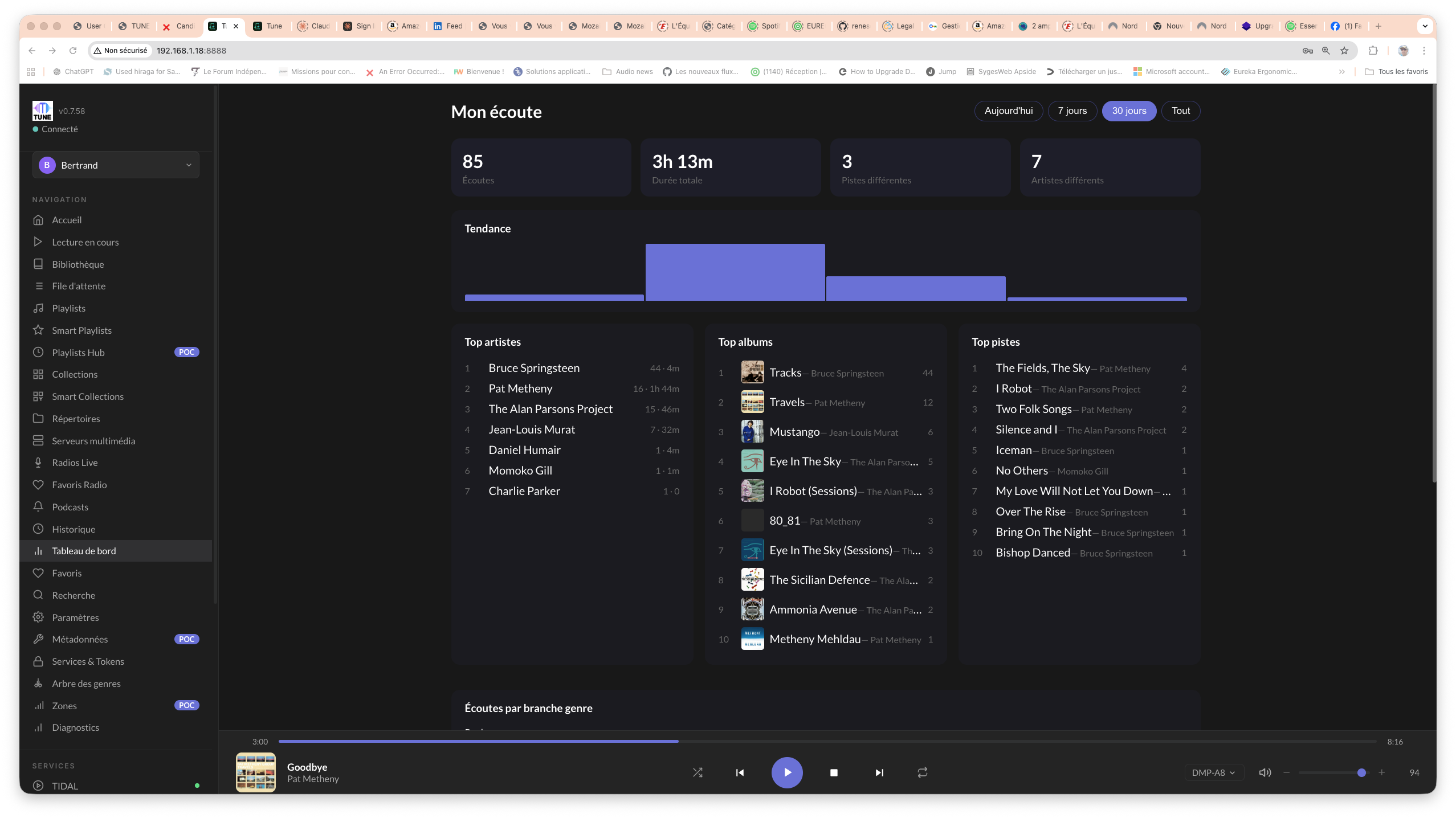
First Tune launch: dashboard, scan in progress, detected zones.
Step 3: scan your local library (variable, 5 min to 2h depending on size)
In the Tune interface (http://<server-ip>:8080) → Settings → Library → Add a folder. Point it to the same path Roon was using (e.g. /Volumes/MusicLibrary or //NAS/music).
Tune kicks off a background scan. For a 30,000-track FLAC library on a Mac mini M1: 4–6 minutes. On a Pi 4 with a remote NAS: about 1h30. The scan is resumable (you can interrupt and restart it without starting over).
While that runs, import your M3U playlists: Settings → Playlists → Import M3U → select the ~/RoonExport/playlists/ folder. Tune automatically maps the file paths.
Step 4: reconnect Tidal, Qobuz, Spotify, Deezer (5 min)
Settings → Services → add each service with login + password (or OAuth token, depending on the case). Tune will sync:
- Your favorite albums
- Your followed artists
- Your playlists (personal and subscribed)
- Your recent history (Tidal/Qobuz/Spotify)
The big difference from Roon: Tune unifies these sources. A search for "Steely Dan Aja" surfaces the local FLAC version, the Tidal Hi-Res version, and the Qobuz 24/96 version in the same result. You pick the source at playback time, or let Tune select the best available quality.
For details on smart playlists that combine services, see smart playlists across Tidal/Qobuz services.
Step 5: hook up the endpoints (5 min)
This is where Tune drastically simplifies things compared to Roon. No RAAT, no RoonReady, no Roon Bridge to install. Tune automatically discovers anything that speaks DLNA, AirPlay, Sonos, Chromecast, or UPnP on your LAN.
Settings → Zones → Tune lists the endpoints it has detected:
- Naim ND5 XS2 (DLNA UPnP) — works immediately, bit-perfect 24/192
- Linn Klimax DS (DLNA UPnP/Songcast) — works immediately
- HomePod / Apple TV (AirPlay 2) — native multi-room sync
- Sonos One / Beam (Sonos API) — volume + playback control
- WiiM Pro / Mini (DLNA + AirPlay)
- Yamaha AVR / Denon HEOS (DLNA)
Rename the zones with the names you used in Roon ("Living Room", "Kitchen", "Office"). Create groups for synchronized multi-room playback (e.g. "Ground Floor" group = Living Room + Kitchen + Terrace).
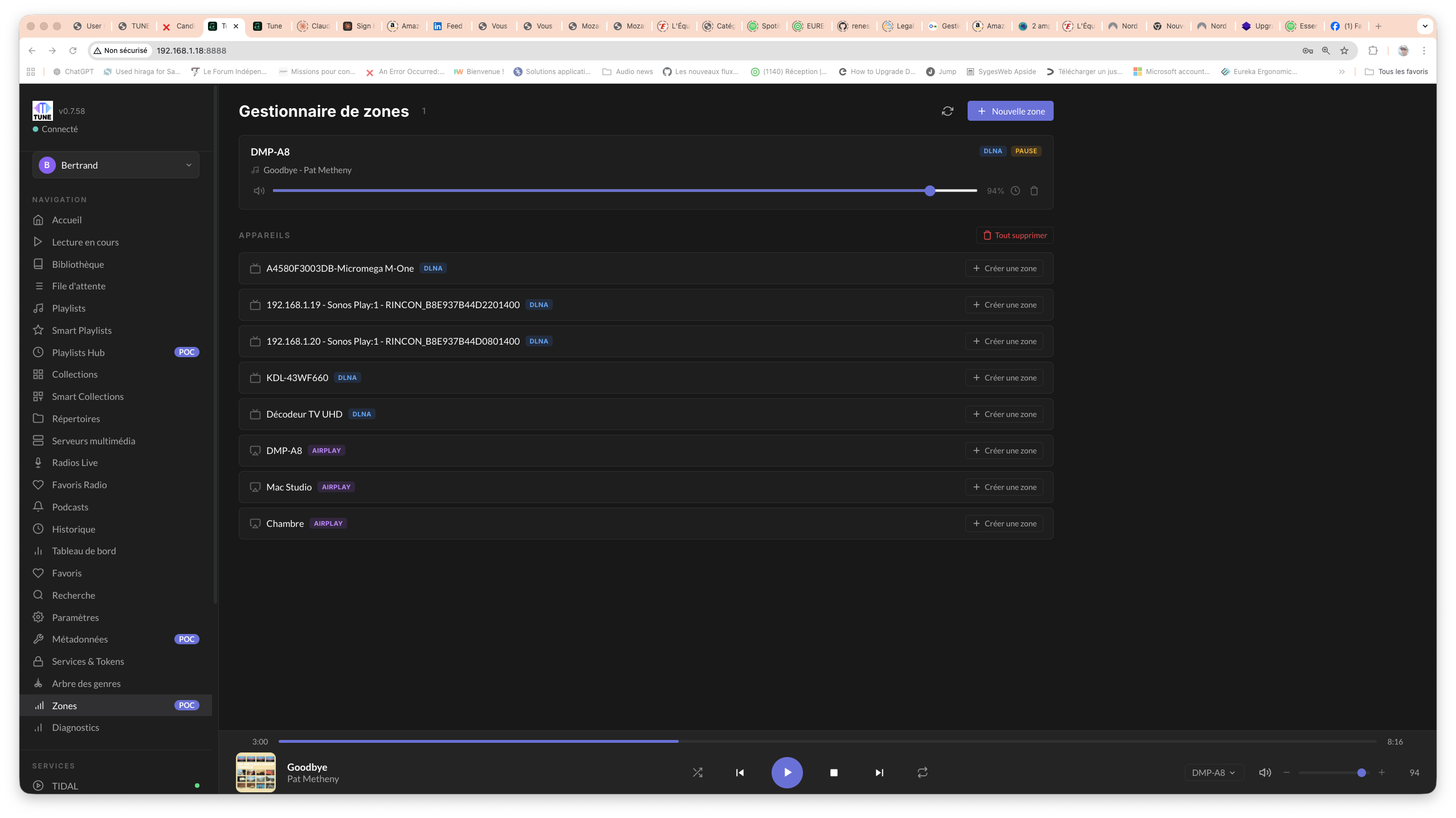
DLNA/AirPlay/Sonos endpoint mapping in Tune. No RoonReady to install.
Step 6: recreate Roon bookmarks as Tune smart playlists (5–10 min)
Roon calls them "bookmarks", Tune calls them "smart collections" and "smart playlists". The logic is the same: a dynamic filter on your library that updates itself automatically.
Example: your Roon bookmark "60s jazz not played in 6 months" becomes a smart collection in Tune:
Genre = Jazz
AND Year >= 1960 AND Year < 1970
AND LastPlayed < (today - 6 months)
ORDER BY Random
The Tune engine supports operators that Roon lacks: branch_of (selection by sub-genre in the hierarchy), cross_service (compare Tidal vs Qobuz vs local versions), and missing_in (present locally but missing from a playlist). See cross-service smart playlists for the recipes.
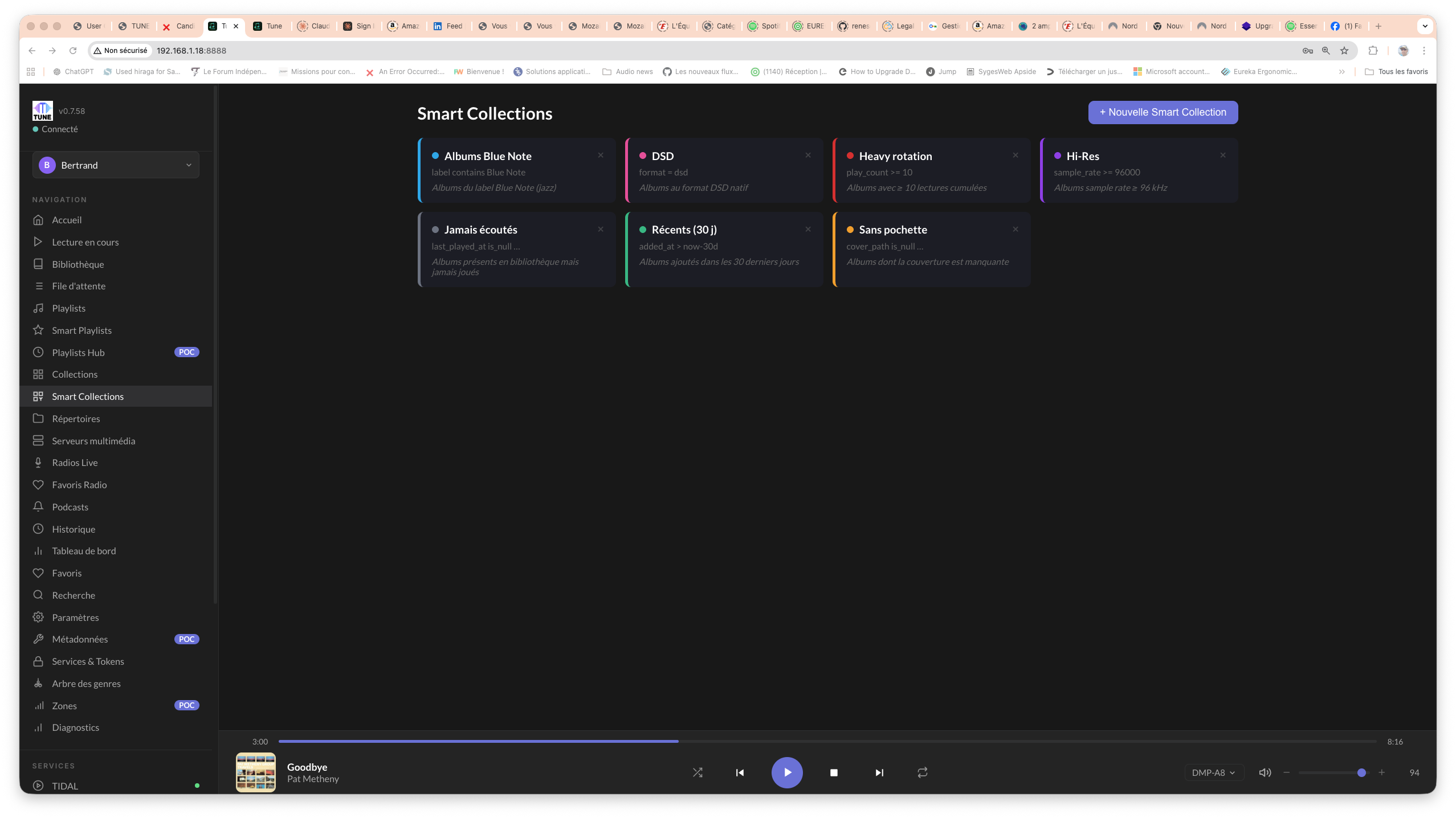
Tune smart collections: the equivalent of Roon bookmarks, with cross-service operators.
Step 7 (optional): bring over your convolution filters
If you were using REW + Roon convolution for your room correction, your .wav filters remain valid. Tune loads them via Settings → Audio → Convolution → Import filter. Expected format: stereo .wav (left.wav + right.wav) at the target sample rate.
Roon's parametric EQ (PEQ) has to be re-entered manually: Tune offers an identical one (10 parametric bands per zone, low/high shelf, peaking, notch). If you're starting from REW filters, export them as .txt and copy the values across.
The full REW → Tune workflow (UMIK-1 measurement, filter generation, zone application) is documented in Tune + REW: automatic room correction.
Frequently asked questions
Can I leave Roon installed during the transition?
Yes, and it's recommended. Roon and Tune coexist without conflict (different discovery protocols, different ports). You shut Roon down once you're sure Tune covers your needs, usually after 1–2 weeks.
Will Tune modify my music files?
No. Tune is strictly read-only on the source folders. No tag writes, no hidden files, no moves. The index database is stored separately in ~/.tune/library.db.
Will my embedded artwork be preserved?
Yes. Tune reads embedded artwork first, then cover.jpg/folder.jpg in the album folder, and falls back to MusicBrainz/Discogs fetching as a last resort.
How long does it take to scan a large library?
On a Mac mini M1 with local SSD: 100,000 tracks in 12 minutes. On a Pi 4 + gigabit NAS: 100,000 tracks in 2h30. The scan uses every available CPU core.
Can I also migrate from JRiver, Audirvana, or Plex?
Yes, the workflow is identical for JRiver (export JRiver MPL playlists → convert to M3U). For Audirvana and Plex, exporting via M3U works as well. See migrating from JRiver to Tune for the details.
What about my Naim/Linn/Lumin RoonReady streamers?
All these streamers speak DLNA UPnP alongside RoonReady. Tune detects them automatically, with bit-perfect playback at 24/192 or 24/96 depending on the model. No need to disable RoonReady on the streamer side.
Try Tune
Tune is in free beta, multi-platform. Migrate from Roon in 30 minutes, without touching your music files.
Further reading
- Tune vs Roon: full 2026 comparison
- Why I left Roon after 4 years
- Migrating from JRiver to Tune (convolutions)
- 2026 self-hosted music server guide

Bertrand Clech — Founder of Mozaik Labs, creator of Tune. 40 years of audiophile passion, DIY speaker builder (Supravox 215 TQWT, Supravox Jensen 285), REW measurements + miniDSP 2x4 HD Dirac DSP.